InspectionXpert for PDF
Minimize

Easily Capture Inspection Data from PDF & TIFF 

InspectionXpert for PDF and TIFF filesInspectionXpert for PDF is first article and in process inspection software that automates the creation of a bubbled print and inspection report. InspectionXpert for PDF™ reads in your PDF and TIFF inspection drawings. As you capture each dimension, InspectionXpert for PDF automatically adds a uniquely numbered balloon and captures the data so you can review it for accuracy before exporting to a ballooned PDF drawing or to an excel-based inspection report form.

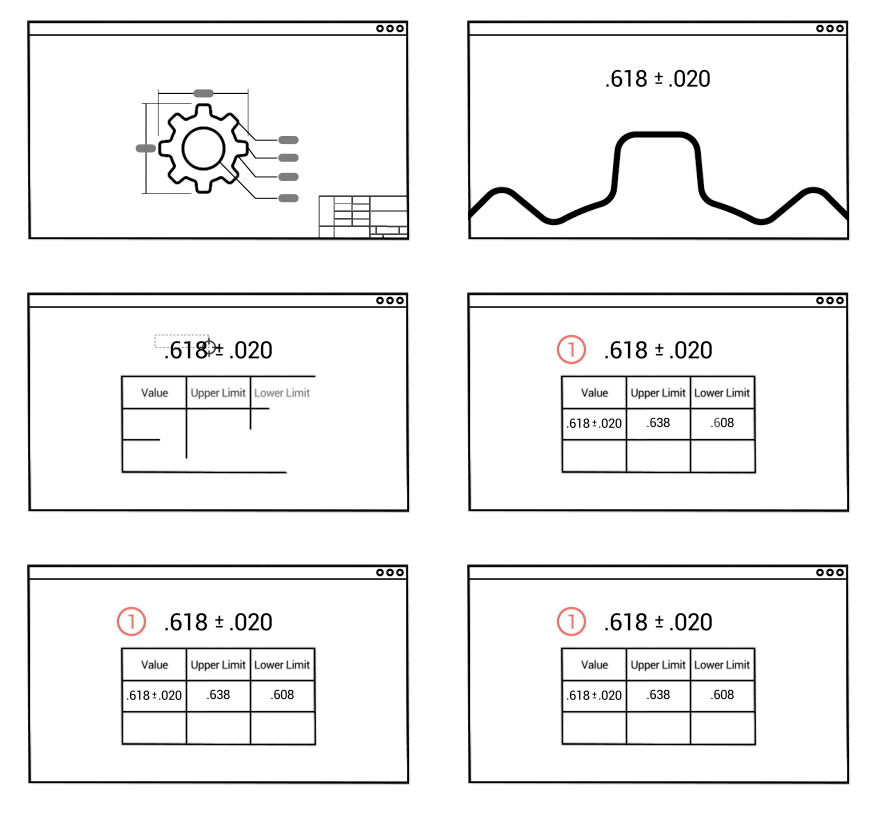
Just click and drag to capture each inspection dimension and InspectionXpert for PDF uses searchable text recognition or Optical Character Recognition (OCR) to read the quantity, nominal dimension, plus and minus tolerances and type. InspectionXpert captures horizontal and vertical dimensions, split dimensions, notes, hole callouts, finish symbols, and GD&T feature control frames.

Capture Even More Information Than Before

InspectionXpert OCR Captures Nominal Value and Plus Minus Tolerance InspectionXpert for PDF's trained OCR can read the type of dimension--such as diametric or linear--and brings over the dimension data, even doing the heavy lifting for you by calculating the upper and lower limits. ISO 286 hole and shaft fit tolerances and support for European numeric formats are supported as are plus/plus and minus/minus tolerances.

Easily enter inspection methods and operations, add a comment, or use one of our custom fields to capture information unique to your company's processes. Lists are user-customizable and can be tied to a database or other central source for dynamic updating. Add or modify Inspection Project Properties to capture information such as drawing revision or part name or add your own custom project properties. Once data has been added to your custom properties it can be mapped over to your inspection reports.

Powerful Customization Options 

InspectionXpert lets you determine the size, color, and location of the balloons on your drawing or add a custom grid to your inspection drawing to easily find inspection data on large or complex drawings. Your grid location data is easily transferred to your inspection report form and you can specify a grid location to zoom to on your drawing.

Customizable Grid in InspectionXpert InspectionXpert's custom grid lets you define the row and column options to match your company or your client's specifications. You can even specify the region to which the grid should align such as the entire drawing or click and drag across a region to get the exact alignment you want. Enabling or disabling the grid can be done with one click in the InspectionXpert interface.

Default tolerances can be set up by precision or by range for linear and angular dimensions and asymmetrical tolerances can be assigned. Define settings for default tolerances, ballooning, exporting and more and save them as a project template for specific clients or projects for easy reuse.

Easy NavigationTight integration makes navigation and editing fast and easy

Tightly integrated navigation tools enable users to click on a balloon in their drawing to view and edit the data for that item. Clicking on a row in their characteristic table highlights the balloon on their drawing. InspectionXpert for PDF's ribbon user interface makes performing common tasks faster and easier.

Quickly Handle Drawing Revisions

InspectionXpert Drawing Compare and Replace

No more starting over from scratch when you recieve a revised inspection drawing. InspectionXpert for PDF lets you compare drawing revisions to see what's changed.  From there you can replace the drawing in an existing project and simply recapture, insert, or delete items to process the incremental changes in the revision.   


Instantly Export to PDF and Excel


AS9102 Form 3 for First Article Inspection in InspectionXpertExport your finished drawing to a ballooned PDF that can travel through your manufacturing process or be captured in a PDM/PLM system for revision control purposes.

Export to standard Inspection Report templates such as AS9102 or PPAP forms, or use the InspectionXpert Template Editor to create your own custom reports for First Article, in-process, final, or receiving inspections.

Because reports are Excel-based, you have the full power of Excel when designing their inspection report templates. Macros, charts, pivot tables, formulas, conditional formatting and more can all be employed to create unique and powerful reports.

Add Measurements to your Project

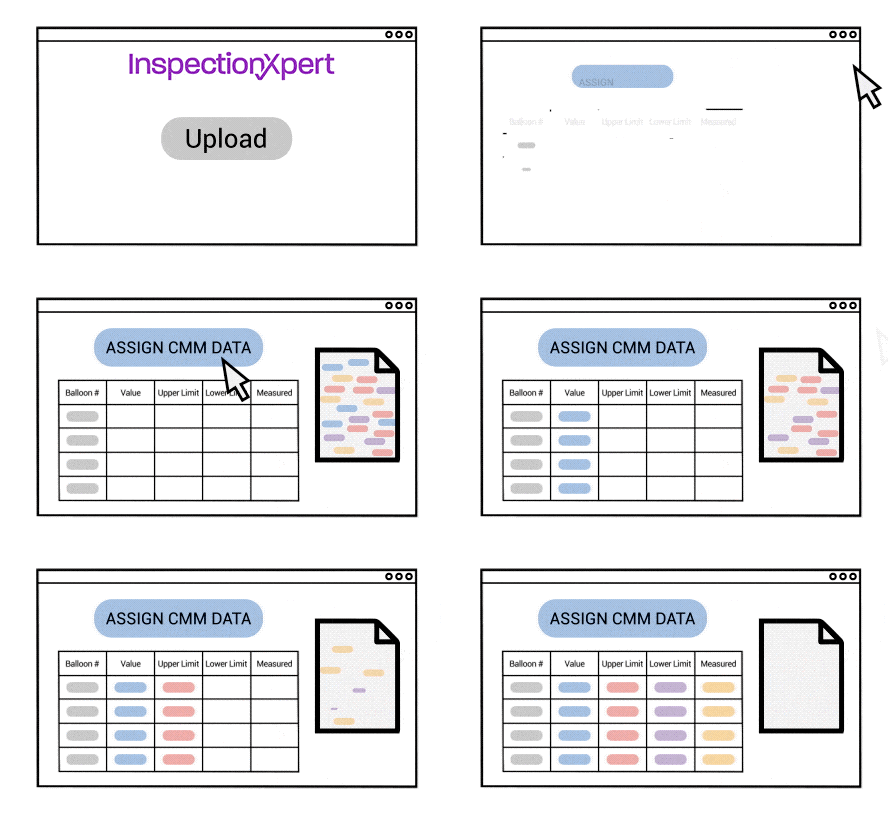
MeasurementsXpert Module can be purchased as an add-onNew modules can be purchased to add functionality to InspectionXpert.  MeasurementXpert allows you to enter measured values for each piece to be inspected then compares the required value with the active value and marks the measured value as In Tolerance, Out of Tolerance or Marginally Within Tolerance based on your settings.  MeasurementXpert then highlights the measurement cell and the dimension in the drawing based on the colors you define, such as green for Pass, red for Fail and yellow for marginally in tolerance. Publish your results into your final inspection report.

Extend Your Investment by Networking

InspectionXpert for PDF is offered as a standalone license that is nodelocked to an individual computer.  Extend the value of your investment by networking, or floating, your licenses.  Purchase the networking option for a one-time cost and any licenses you currently own or purchase in the future can be installed on multiple computers so the licenses can be shared.  The networking option turns your standalone license into a concurrent user license.

Integrate with Quality Systems 

InspectionXpert for PDF allows you to export your inspection project directly to your Net-Inspect application. InspectionXpert also integrates with the CEBOS MQ1 application.  And because InspectionXpert exports to Excel/CSV you can easily import inspection data into almost any database or software program including CMM, ERP, MRP and custom software systems. 


View a Video
Minimize


Requirements
  
Our Customers
Minimize

Download the MIC Group Case Study"Without InspectionXpert, we would need at least four more employees to keep up with the current workload. The difference amounts to an annual savings of $120,000 per year based on a $30,000 employee salary!" 

Nathan Byman, General Manager

Copyright and Trademark Notices Minimize


Copyright 2004-2011 Extensible CAD Technologies, LLC. All rights reserved.